Direct Drive vs Bowden Retraction: Settings and Tradeoffs Explained
Direct drive and Bowden tube extruder architectures require fundamentally different retraction settings because of the physical distance between the drive motor and the nozzle. Using the wrong retraction profile on the wrong architecture is one of the most common causes of both stringing and heat-creep clogs. This guide explains the physics, gives target settings for all common materials, and covers the tradeoffs that should inform your setup choice.
How Each Architecture Works
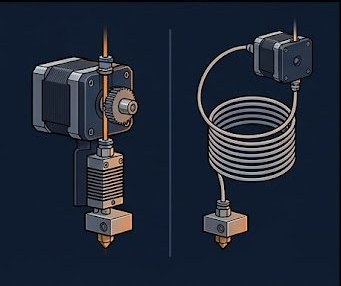
In a direct drive setup, the extruder motor sits directly on the hotend. The filament path from drive gear to melt zone is typically 20–40mm. Retraction moves the filament a short distance and relieves nozzle pressure almost immediately.
In a Bowden setup, the motor is fixed to the frame and filament travels through a PTFE tube 300–600mm long to the hotend. Because the tube is slightly compressible under filament tension and the filament itself has some flex, retraction must overcome the compliance of the entire path before nozzle pressure drops — which is why Bowden retraction distances are 4–8x higher than direct drive values.
Retraction Settings by Material and Architecture
| Material | Direct Drive Dist. | DD Speed | Bowden Dist. | Bowden Speed |
|---|---|---|---|---|
| PLA | 0.5–1.0 mm | 25–45 mm/s | 3.5–5.0 mm | 40–60 mm/s |
| PLA+ | 0.8–1.2 mm | 25–35 mm/s | 4.0–5.0 mm | 40–50 mm/s |
| PETG | 0.8–1.5 mm | 25–35 mm/s | 4.0–5.5 mm | 35–45 mm/s |
| TPU 95A | 0.5–1.0 mm | 15–25 mm/s | Not recommended | n/a |
| ABS / ASA | 1.0–1.5 mm | 30–45 mm/s | 4.5–6.0 mm | 40–55 mm/s |
| Nylon | 1.0–2.0 mm | 20–30 mm/s | 5.0–7.0 mm | 35–45 mm/s |
| PC Blend | 1.2–1.8 mm | 25–35 mm/s | 4.5–6.0 mm | 35–45 mm/s |
Why TPU Cannot Be Reliably Printed on Bowden
Flexible filaments buckle under compression inside a Bowden tube. During retraction, the filament folds inside the PTFE tube rather than pulling back cleanly. During the restart move, the buckled section jams. Some users have success with TPU 95A Shore on very short Bowden setups under 200mm, but in general flexible filaments require a direct drive extruder with a tight filament path that prevents lateral buckling.
Diagnosing Retraction Problems
Too much retraction on a direct drive printer: filament grinds against the drive gear on repeated retracts, leaving dust and grinding marks on the strand. This leads to under-extrusion and skipped layers. Never exceed 2mm on a well-maintained direct drive setup.
Too little retraction on a Bowden printer: the melt pool does not de-pressurize before the travel move, leaving a continuous string across every open-air path.
Retraction speed too high: the drive gear slips on the filament surface, especially with PETG and flexible materials. Never exceed 60 mm/s, and stay under 35 mm/s for PETG and TPU.
Which Architecture Should You Choose?
Direct drive is the better choice for most users. Modern printers like the Bambu Lab X1/P1 series, Prusa MK4, Voron, and Ratrig all use direct drive as their primary architecture because it handles more materials reliably with simpler tuning. Bowden setups (classic Ender 3, CR-10) produce excellent results on PLA, PETG, and ABS but struggle with flexible and high-hygroscopic materials.