How to Eliminate PETG Stringing: Step-by-Step Diagnostic Guide
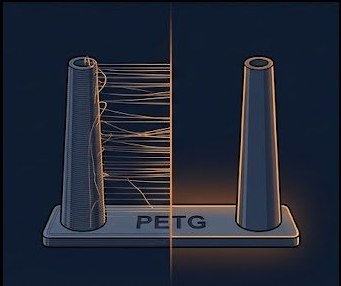
PETG is the most stringing-prone of the common FDM materials because it is highly viscous at print temperature and extremely adhesive to itself. The hairnet of thin strands between towers is the classic symptom, but the fix is almost never a single setting — it is a specific sequence of adjustments applied in order. This guide walks you through that exact sequence.
Root Causes of PETG Stringing
Before adjusting any sliders, understand the three root causes. Fixing the wrong one wastes time and material:
- Moisture: Wet PETG boils inside the nozzle and oozes uncontrollably between travel moves. No retraction setting compensates for steam pressure. Dry the spool first, always.
- Temperature too high: Every 5°C above the optimal print temp roughly doubles ooze rate in PETG. Nozzle temperature is the single highest-leverage adjustment.
- Insufficient retraction: If the filament is not pulled back far enough before a travel move, the molten plug oozes along the travel path and solidifies as a string.
Step-by-Step Fix Sequence
Step 1: Dry Your Filament
Dry at 65°C for 6 hours before attempting any settings changes. Wet PETG looks exactly like a retraction problem but is not fixable with retraction. See our filament drying guide for equipment details.
Step 2: Lower Nozzle Temperature
Print a temperature tower from your current temperature down to 220°C in 5°C steps. Most PETG formulations have their minimum-stringing window between 225–235°C. Drop to the lowest temperature that still shows clean layer bonding and no under-extrusion on bridges.
Step 3: Tune Retraction Distance
Print a retraction test tower (two tall cylinders 50mm apart). Use the starting points in the table below and adjust in 0.2mm increments. Values above 2mm on a direct drive extruder frequently cause clogs.
| Extruder Type | Starting Retraction | Max Safe Limit | Retraction Speed |
|---|---|---|---|
| Direct Drive | 0.8–1.2 mm | 2.0 mm | 25–35 mm/s |
| Bowden (PTFE) | 4.0–5.0 mm | 7.0 mm | 40–50 mm/s |
Step 4: Increase Travel Speed
Faster travel moves give the molten nozzle less time to drag a string across a gap. Set travel speed to at least 150 mm/s, ideally 200–250 mm/s if your printer supports it. This is one of the most effective changes for PETG specifically and costs nothing in print quality.
Step 5: Disable Z-Hop
Z-hop pulls the nozzle upward before a travel move, which creates additional ooze time while the Z axis lifts. For PETG, disable Z-hop entirely, or limit it to 0.1mm maximum. Combine with combing to minimize travel paths over open space.
Step 6: Enable Combing Mode
Combing (called "avoid crossing perimeters" in PrusaSlicer) forces all travel moves to stay within the part boundary, so any ooze falls inside the wall cavity instead of across open air.
Slicer-Specific Settings Summary
| Setting | Cura | PrusaSlicer / SuperSlicer |
|---|---|---|
| Retraction on Layer Change | Enable | Retract on layer change: yes |
| Wipe Before Retract | Enable (2mm) | Wipe while retracting: yes |
| Combing | Not in Skin | Avoid crossing perimeters: yes |
| Z-Hop | Disabled | Lift Z: 0 |
| Pressure Advance | n/a (firmware) | Pressure advance: 0.04–0.08 |